Steam has rolled out a new update that gives Steam Workshop mod creators much more control over how their mods work with different game versions. The change introduces proper version control for Workshop mods, making it easier for both game developers and mod authors to keep mods compatible as games continue to evolve.
Until now, mod compatibility often broke when games received major updates. Mods built for older versions could stop working overnight, leaving players confused and mod creators scrambling to fix issues. Steam’s new system is designed to reduce these problems by letting developers clearly define game versions and allowing mod creators to state exactly which versions their mods support.
Version control is added to Steam Workshop mods
The new system works through a combination of new Steam APIs and new options on Workshop item pages. Game developers can now organize their past and current game versions inside Steamworks and enable a setting called “Enable Game Branch Versions.” This makes different versions of the game visible and usable for mod compatibility tracking.
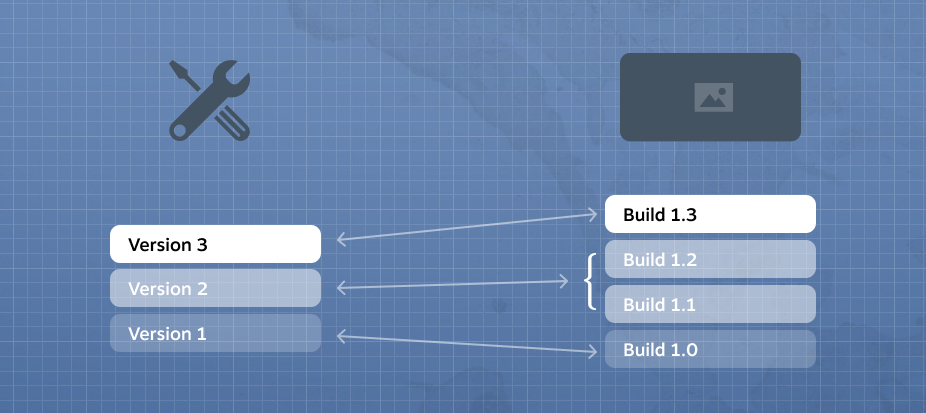
As soon as Game Branch Versions are enabled, mod creators gain new tools. They can now upload multiple versions of the same mod under a single Workshop item. Each mod version can be tagged to work with specific game versions, or marked as compatible with all versions if the mod is simple and unlikely to break. This tagging is handled directly from the Workshop page under Change Notes, making it easy to manage without external tools.
Deals season is here folks, and with it comes a plethora of eye-catching price cuts on some of the industry’s most popular tech. Below are some of the best deals you can find right now.
*Prices and savings subject to change. Click through to get the current prices.
For developers who use custom in-game Workshop browsers, Steam also provides API functions to display supported game versions directly in-game. When uploading or updating a mod, developers can even let users choose which game version the mod is intended for, ensuring the correct version is used.
Steam strongly recommends that game developers communicate clearly with mod authors before enabling version support. This helps set expectations around how updates, beta branches, and compatibility will be handled in the future. Once enabled, mod authors immediately see the new version-tagging options.