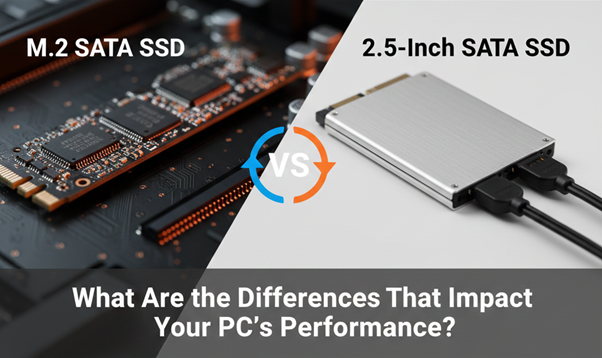
Few computing upgrades provide a more dramatic performance boost than switching from an old hard disk drive (HDD) to a solid-state drive (SSD). However, a dizzying array of SSD formats awaits you once you’ve made your decision. The traditional 2.5-inch SATA SSD and the newer, smaller M.2 SATA SSD are two of the most commonly used formats.
Understanding the differences between these two drive types is critical for making an informed purchasing decision, whether you are building a new desktop, revitalizing an old workstation, or determining the best SSD for laptop SATA vs M.2 for a compact system.
While both interfaces use the same basic SATA protocol, differences in form factor, installation, and specific use cases can significantly impact your system’s compatibility, thermal profile, and overall appearance. This comprehensive guide explains the key differences between M.2 SATA and 2.5 SATA drives to help you decide which is best for your next upgrade.
Form Factor and Physical Dimensions: The Most Obvious Difference
The most obvious distinction between these two drive types is their physical design, a concept known as the “form factor.”
1. 2.5-Inch SATA SSD
The 2.5-inch SATA SSD represents the spiritual successor to the laptop hard drive. It is enclosed in a protective casing measuring approximately 100 mm in length, 70 mm in width, and 7 mm in thickness. This enclosure makes the drive relatively durable and easy to handle.
- Installation: A drive bay (typically 2.5-inch or 3.5-inch with an adapter) and two separate cables (SATA data and SATA power) are required for installation. This standardized size ensures nearly universal compatibility with most desktop PCs and many older laptop models.
2. M.2 SATA SSD
The M.2 SATA SSD format represents the evolution of miniaturization. It is essentially a bare circuit board, also known as a “gumstick” drive due to its shape. These drives are available in various lengths, the most common being the 2280 (22 mm wide by 80 mm long).
- Installation: The M.2 SATA SSD is screwed directly into a dedicated slot on the motherboard. This eliminates the need for separate data and power cables, resulting in significantly less cable clutter, a significant advantage for compact builds and laptops. The compact design enables ultra-thin laptops and motherboards with limited physical space.
For those interested in minimalist or Small Form Factor (SFF) PC builds, the m2 SATA size difference is a significant selling point. They weigh mere grams (typically 5-10 g), far less than their 2.5-inch counterparts (40-60 g).
Speed and Performance: Understanding the SATA III Ceiling
One of the most common misconceptions about M.2 SATA vs. 2.5 SATA drives is that they are inherently faster. This belief frequently stems from the confusion between M.2 SATA and M.2 NVMe.
When utilizing the SATA interface, both the 2.5-inch SATA SSD and the M.2 format are constrained by the same technology, such as the SATA III (6 Gb/s) bus.
1. The SATA III Limit
The theoretical maximum bandwidth for the SATA III interface is 600 MB/s. In real-world performance benchmarks, both 2.5-inch SATA and M.2 SATA SSDs achieve sequential read/write speeds of 500-560 MB/s.
As a result, the speeds between M.2 SATA and 2.5 SATA are nearly identical. Switching from a 2.5-inch SATA drive to an M.2 SATA drive will not result in a measurable increase in everyday tasks, boot times, or game loading speeds if the underlying interface remains SATA III.
2. M.2 NVMe: The True Speed Demon
The confusion arises when M.2 drives use the faster NVMe (Non-Volatile Memory Express) protocol over the PCIe bus. An M.2 NVMe drive (which is physically compatible with many M.2 slots) can reach speeds of up to 7,500 MB/s or higher, orders of magnitude faster than any SATA drive.
When evaluating m.2 vs sata performance, it is crucial to clarify which M.2 technology is being discussed:
Comparison Table: 2.5” SATA SSD vs. M.2 SATA SSD vs. M.2 NVMe SSD
In short, the primary advantage of M.2 SATA SSDs over 2.5 SATA SSDs is physical convenience and compatibility with smaller devices, rather than performance.
Heat Production and Energy Consumption
Due to the significant size difference, the thermal dynamics of these drives vary, which is particularly relevant for laptop users or those concerned with efficiency.
1. Heat Production
The 2.5-inch form factor provides an enclosed metallic or plastic case, offering better passive heat dissipation due to its larger surface area. The components inside are less densely packed.
Conversely, the compact nature of the M.2 stick means the NAND chips and controller are much closer together. It can lead to the M.2 SATA SSD producing more concentrated heat than a 2.5-inch drive under heavy load. While this is less of a concern with M.2 SATA drives than with high-speed NVMe drives, careful consideration of cooling or airflow in small chassis is still recommended.
2. Energy Consumption
In terms of power consumption, the M.2 SATA format is generally more energy efficient than the 2.5-inch counterpart. This feature makes the M.2 drive a popular choice for modern, battery-powered devices. Reduced power draw is an essential factor when choosing the best SSD for a laptop, SATA vs M.2, as it can contribute to extended battery life.
Installation, Compatibility, and Storage Capacity
Choosing between a 2.5-inch or an M.2 drive is often less about preference and more about what your motherboard or laptop supports.
1. Compatibility
- 2.5-Inch SATA: Offers the broadest compatibility. Virtually all modern and older desktop motherboards, as well as most laptop chassis built in the last decade, have a SATA port and a corresponding 2.5-inch bay.
- M.2 SATA: Requires a dedicated M.2 slot on the motherboard. Not all M.2 slots support both SATA and NVMe. Critically, M.2 SATA drives use a different “key” (B-key or B+M key) than M.2 NVMe (M-key) drives, though many modern slots support the B+M key configuration. Always check your motherboard’s manual to confirm the port’s protocol support (SATA or NVMe/PCIe).
2. Installation Simplicity
The 2.5-inch SATA requires mounting the drive and connecting two cables, a simple but more involved process. The M.2 SATA installation is arguably more straightforward: slide the card in and secure the screw. This plug-and-play simplicity, especially in tight chassis, is a significant advantage of the M.2 format.
3. Storage Space and Durability
The larger volume of the 2.5-inch casing allows manufacturers to package more NAND flash chips. Historically, and even currently, this often means that 2.5-inch SATA SSDs offer higher maximum storage capacities (often up to 4TB or more) compared to M.2 SATA drives (which commonly max out around 2TB for consumer models).
In terms of physical durability, the 2.5-inch SATA SSD vs. M.2 comparison tilts slightly toward the older format. The 2.5-inch SATA enclosure provides physical protection, making it highly strong for use in external drive enclosures where it may be moved or occasionally dropped. The exposed components of the M.2 drive rely on the computer chassis’s protective environment for safety.
Commercial Considerations: Price and Availability
From a commercial perspective, the price difference between comparable 2.5-inch and M.2 SATA drives have significantly narrowed.
Because they both operate under the same SATA III protocol, the manufacturing costs for the core flash chips and controller are similar. Any price variance usually comes down to:
- Enclosure/Assembly: The 2.5-inch drive requires more material (casing and connectors) and additional labor for assembly.
- Market Demand: The smaller M.2 format often commands a slight premium due to its suitability for thin, high-demand devices, especially in the context of the M.2 vs. 2.5 SATA SSD choice for laptop upgrades.
However, the widespread availability and sheer volume of production mean that 2.5-inch SATA SSDs often represent the best value proposition for high-capacity drives or for users with traditional desktop setups who don’t face space constraints.
The Final Verdict on M.2 SATA vs. 2.5 SATA
When comparing M.2 SATA and 2.5 SATA, the decision comes down to design rather than speed.
If you are looking to get the most out of your storage space, save some cash, or breathe new life into an older system that has existing drive bays, the 2.5-inch SATA SSD is a fantastic option. It’s compatible with just about everything and built to last.
When it comes to upgrading a thin-and-light laptop, building a compact PC, or simply aiming for a tidier, cable-free internal setup, the M.2 SATA SSD is the best choice. The easy plug-in installation and small physical size really stand out, making it the best option for devices with limited space.
Keep This Essential Point in Mind:
The key difference with m2 SATA lies in the form factor and installation, rather than speed. If you’re looking for a significant boost in performance, consider skipping both SATA formats and choosing an M.2 NVMe (PCIe) drive, provided your system can accommodate it. For all users, both 2.5-inch SATA SSDs and M.2 drives offer high-speed SATA III performance, giving your machine a refreshing boost.
If you are still unsure about how to choose the right SATA storage and make an informed purchase, Direct Macro’s experienced team is available to assist you 24/7. Contact us at (855) 483-7810 or visit our website for consultations and bulk purchasing information.
Frequently Asked Questions (FAQs)
-
Is M.2 SATA faster than 2.5-inch SATA SSDs?
No. The SATA III interface limits both M.2 SATA and 2.5-inch SATA to approximately 560 MB/s. M. 2 drives that utilize the NVMe protocol over PCIe provide a noticeable boost in performance compared to the standard SATA limit.
-
Can I use both a 2.5-inch SATA SSD and an M.2 SATA SSD in the same computer?
Yes, most modern desktops and many larger laptop systems support both. You can use the M.2 for the operating system and the 2.5-inch for mass storage, but always check your motherboard manual for potential port conflicts.
-
Does M.2 SATA provide better gaming performance than 2.5-inch SATA?
No. Since both M.2 SATA and 2.5-inch SATA share the same 560 MB/s speed limit, you won’t notice any difference in game loading times or in-game performance. Real enhancements need M.2 NVMe drives.