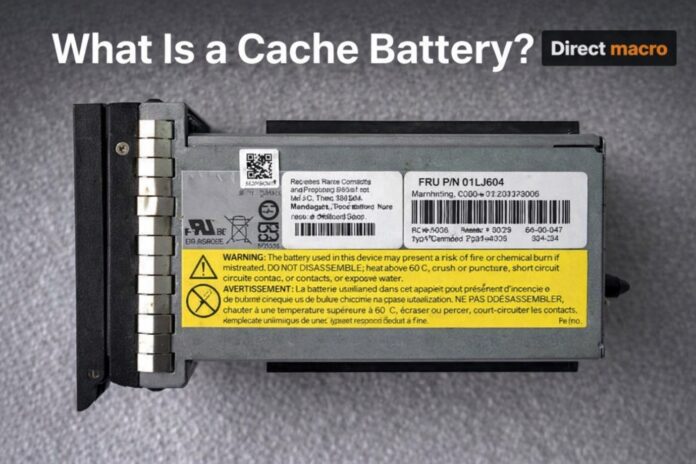
The cache battery is a small but crucial part of enterprise computing that works as the ultimate fail-safe. In this world, performance is measured in milliseconds, and data integrity is unquestionable.
Whether you are responsible for a small department computer or a huge data center, you need to know what the battery-backed cache does so that you don’t lose a lot of data when the power goes out or hardware fails.
What Is a Cache Battery?
What is a cache battery? To answer that, let’s first look at how servers handle data nowadays. Occasionally, when a server writes to a disk, it doesn’t go straight to the hard drive or SSD. This is because it usually stops in “cache memory,” which is a fast-staging area on the RAID controller and is typically DRAM.
To connect to a RAID (Redundant Array of Independent Disks) controller, a cache battery is a small rechargeable battery pack. Its only job is to power this temporary cache memory in case the main power supply goes out. Any “dirty data” that is still in the cache but hasn’t been written to the internal hard drives would be erased as soon as the power goes out without this power.
·The Importance of the Battery Cache
This setup is commonly known in technical circles as a battery cache system. It acts as a link between the speed of RAM and the durability of a physical disk. The system achieves significantly higher performance by allowing the controller to acknowledge a “write” command as soon as the data enters the cache, rather than waiting for the slower mechanical or flash storage to complete the job. However, this performance boost carries a risk that only the cache battery can mitigate.
How Does a Cache Battery Work?
The mechanics of a battery backed cache are simple but important. To understand the workflow, we need to look at the two main caching strategies used in enterprise storage: write-through and write-back.
1. Write-Through Caching
In this mode, data is written to both the cache and the permanent storage simultaneously. The system must wait for the slower disk to confirm the write before moving on to the next task, making it slow but safe. In this scenario, a battery is less important for data integrity but provides no performance benefit.
2. Write-Back Caching
The server cache battery truly excels in this scenario. In Write-Back mode, the controller writes data to the high-speed cache and immediately notifies the operating system, “Done!” This allows the server to move on to the next request immediately. The controller then “flushes” the data to disk in the background.
If power goes out while data is in cache but not yet on disk:
- The cache battery kicks in instantly.
- It maintains the electrical charge in the DRAM chips, keeping the data alive.
- When power is restored, the RAID controller finds the “dirty” data in the cache and immediately writes it to the permanent disks.
The Role of the Cache Battery in RAID Controllers
The cache battery in RAID controller configurations is what allows for “High Performance” mode. As a safety measure, most professional RAID cards (such as the Dell PERC, HP Smart Array, or IBM Serve RAID) will disable write-back caching and force the system into write-through mode if the battery is low.
· Why RAID Controllers Need Protection
In a cache battery RAID setup, the controller manages multiple disks. If power goes out and a partial write occurs across a RAID 5 or RAID 6 array without a battery backup, you may encounter a “RAID write hole.” This is a condition in which the data and corresponding parity bits become out of sync, resulting in corrupted files or a complete array failure. The storage cache battery provides the controller enough time to complete its logic or store the data until the next boot cycle.
Different Types of Cache Protection
Although we use the term “battery” broadly, technology has advanced. In the context of a server cache battery, you will typically encounter two types:
1. Battery Backed Write Cache (BBWC)
The traditional method employs lithium-ion (Li-ion) or nickel-metal hydride (NiMH) batteries. These functions work exactly like laptop batteries, holding a charge for 48–72 hours. However, they have a limited lifespan and should be replaced every 2 to 3 years.
2. Flash Backed Write Cache (FBWC)
Modern systems are moving toward FBWC. Instead of a chemical battery, these incorporate a supercapacitor and a small NAND flash memory module.
- When power fails, the supercapacitor provides a brief burst of energy (only a few seconds).
- The controller uses that energy to quickly copy the contents of the volatile DRAM to the non-volatile Flash memory.
- Because the data is now on Flash memory, it can remain there indefinitely without requiring a constant charge.
Maintenance: Managing Your Battery Cache
A cache battery is a consumable item. Like a smartphone battery, its ability to hold a charge degrades over time due to heat and chemical aging.
The “Relearn” Cycle
Most servers have an automatic “Battery Relearn” or “Calibration” cycle every few weeks. During this process, the controller fully discharges the battery and then recharges it to determine its remaining capacity.
- Warning: During a relearn cycle, the controller frequently disables write-back caching because the battery cannot protect the data while it is being tested. You may notice a temporary decline in performance during this time.
Signs of Failure
- Performance Drops: Examine the RAID logs if your server becomes noticeably slow. The controller could have switched to write-through mode after the cache battery failed a self-test.
- Amber Lights: When the battery-backed cache voltage falls below a safe threshold, most servers illuminate a chassis warning light.
- Boot Errors: During the Power-On Self-Test (POST), you may see messages such as “Memory/Battery problems were detected” or “The cache and battery are not matching.”
Why Every Server Needs a Storage Cache Battery?
For businesses, the cost of replacing a server cache battery (usually between $50 and $150) is negligible when compared to the cost of data recovery.
Consider a database server with thousands of transactions per second. If there is a power surge and the storage cache battery dies, the database may suffer from “log fragmentation.” This occurs when the database believes a transaction was committed to the disk, but the physical data was never received. Fixing this can take hours of manual database repair or, in the worst-case scenario, a full backup restores, resulting in significant downtime.
Final Thoughts
The cache battery is the unsung hero of the digital age. By providing a safety net for the battery-backed cache, enterprises can enjoy the blistering speeds of modern RAID controllers while avoiding the looming threat of data corruption. Whether you’re using a traditional cache battery in a RAID controller or the newer super capacitor-based flash protection which monitoring the health of your battery cache is one of the simplest and most effective ways to keep your data safe, consistent, and performant.
For more information and details please contact us at (855) 483-7810 or visit our website for bulk order request.
FAQs
-
What does a cache battery do?
A cache battery protects “dirty data” in volatile memory from power outages. It supplies temporary power to the RAID controller, ensuring that pending writes are safely transferred to non-volatile storage.
-
What Is a RAID Cache Battery?
A RAID cache battery is a backup power module that connects to a RAID controller. It prevents data corruption by retaining the cache’s contents until the server restarts or data flushes.